
Your whole Coolify, in your pocket.
Connect your own Coolify instance with an API token, and its dashboard is on your phone: what is running, what is not, and every control that goes with it.


Running your instance is free, with no account and no time limit. Pro is for power users with several instances.
What is Coolpanion?
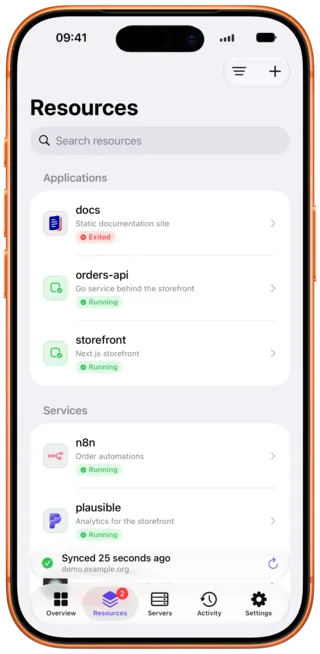
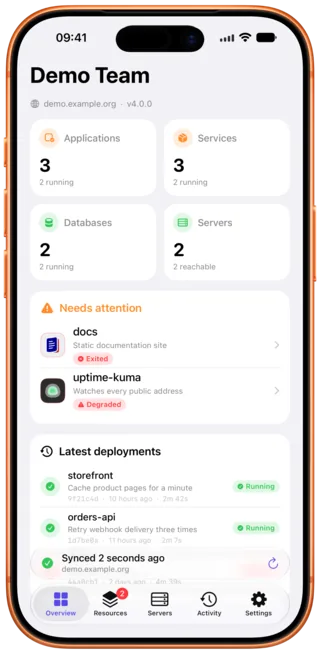
Coolpanion is a native iPhone and iPad client for Coolify, the open-source self-hosted platform for deploying applications, services and databases. You connect your own instance with a Coolify API token, and the app becomes that instance's dashboard: applications, services, databases and servers, their status as Coolify reports it, and a needs-attention list you define yourself. Every action the web dashboard offers is there too, including deploy, restart, start, stop, rebuild without cache, pull request previews, specific image tags and rollback to an earlier image. Container logs stream per container, with filtering, timestamps and live follow. There is no account, no backend of ours in between and no telemetry: the app talks to your instance and nowhere else, and the token is held in the device keychain. Running one instance is free, with no time limit. Coolpanion requires iOS 26 or later and is localised in 11 languages.
What does Coolpanion ask of you?
- No account
- Nothing to sign up for. Paste a token, and you are in.
- No backend
- The app talks to your instance and nowhere else. There is no server of ours in between.
- No telemetry
- No analytics, no tracking, no third-party SDKs, no crash reporting service.
- Pay once
- Free to run your instance. Pro is a one-time purchase, and a yearly plan only if you prefer one.
The dashboard you already know, with a thumb on it.
Coolpanion reads what Coolify actually reports, and gives every screen the native treatment: pull to refresh, swipe actions, share sheets, Dynamic Type.
See what is running. And what is not.
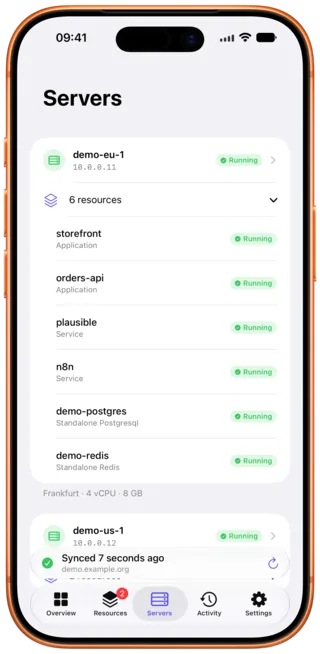
One screen with your applications, services, databases and servers, how many of each are up, and what happened last.
- A "Needs attention" list, with the states that count as trouble entirely up to you
- Status badges everywhere, parsed from what Coolify reports
- The last sync and the last deployments, always in sight
- Optional downtime alerts: switch them on and a background check notifies you when a resource stops being healthy. iOS decides how often that check runs, so treat it as a heads-up rather than an uptime monitor
Redeploy from the bus stop.
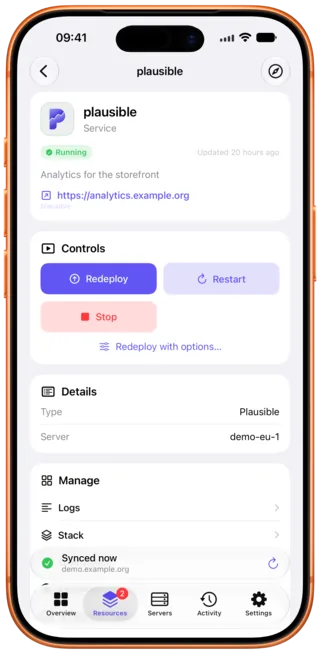
Every control the dashboard gives you, on the resource you are already looking at.
- Deploy, restart, start and stop any resource
- Deploy with options: force a rebuild without cache, deploy a pull request preview, or a specific image tag
- Follow a deployment while it runs, with its build log in a sheet you can close and reopen
- Roll an application back to an earlier image
- Clone a resource, move it to another environment, or delete it
A real log viewer. Not a text dump.
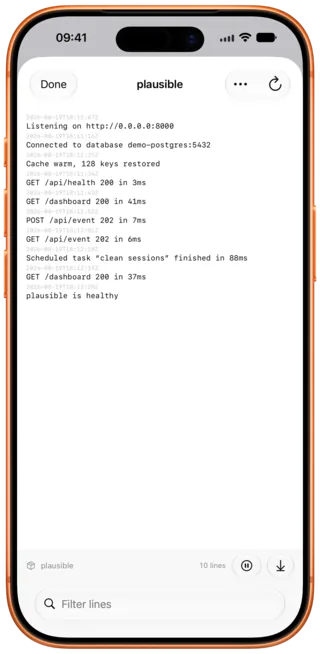
Per container, with everything you would want from a terminal and nothing you would not want on a phone.
- Wrapping, line numbers and timestamps, each on a switch
- A filter field, and live follow while a deployment runs
- Share the lines you are looking at, straight to the share sheet
- Environment variables and shared variables, with values hidden until you ask
Down to the machine underneath.
Not just the resources: the servers they run on, and the history of what you deployed there.
- Reachability, the proxy, Docker cleanup, and the resources each server hosts
- Deployment history per application, with commit, message and duration
- Domains, scheduled tasks, persistent storages and database backups
- Projects, environments, tags, and Coolify's own notification settings
One app, both sizes.
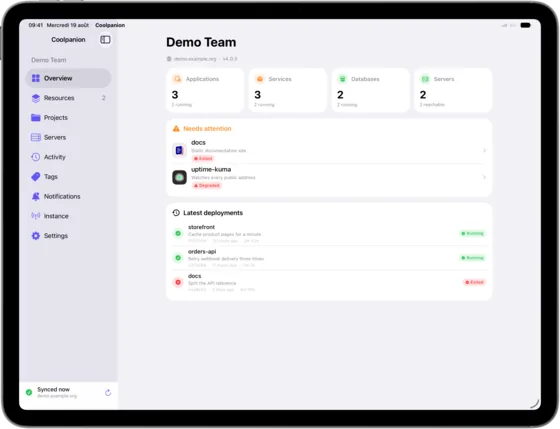
Not a stretched phone screen. On iPad, a sidebar, the resource list and the detail column sit side by side, and the keyboard does the rest.
- A three-column layout in landscape, a compact one in portrait
- Command key shortcuts for the screens you use most
- Optional Face ID lock before the app will control anything
- The same app, on both devices, from one purchase
You never have to pay to run your server.
Driving a Coolify instance from your phone is the free plan, not a teaser of it. Every screen, every log and every action, with no account, no time limit and no nagging. Pro exists only for the few people who need more than that, and if that is not you, you can ignore this whole section.
Free What most people need
One instance, fully controlled, forever. This is the plan the app was built around.
- The whole dashboard. Overview, needs attention, resources, servers, projects, environments and tags.
- Every action. Deploy, restart, start, stop, deploy options, rollback, clone, move and delete.
- Logs and variables. The full log viewer, environment and shared variables, domains, tasks, storages and backups.
- The native parts. The iPad layout, Face ID lock, optional downtime alerts and all 11 languages.
- No catch. Nothing above is a trial, a quota or a countdown. There is no paywall between you and your own server.
Pro Optional · from $19.99 once
For power users only: several instances to keep an eye on, or an appetite for the Insights. Skipping it costs you nothing on the instance you already run.
- Every instance, one app. A second and further Coolify instance, with full control, side by side.
- Backup health. Which databases are backed up, and which one quietly stopped.
- Deployment statistics. How often deployments succeed, and which application or server struggles.
- Configuration timeline. What changed on a resource since the last time you looked.
- Version alerts. Whether your instance is behind, and whether the gap matters.
- Log analysis on device. A failed build explained in plain words, without a single line leaving your iPhone.
- Widgets, Siri and Shortcuts. Your instance on the Home Screen and in Control Center, and a redeploy one Action button press away.
| What you get | Free | Pro |
|---|---|---|
| Coolify instances | One | As many as you like |
| Overview, resources, servers, projects, environments, tags | Yes | Yes |
| Deploy, restart, start, stop, deploy options, rollback, clone, move, delete | Yes | Yes |
| Logs, variables, domains, scheduled tasks, storages, backups | Yes | Yes |
| iPad layout, Face ID lock, downtime alerts, 11 languages | Yes | Yes |
| Backup health, deployment statistics, configuration timeline, version alerts | No | Yes |
| Log analysis on device | No | Yes |
| Widgets, Siri and Shortcuts | No | Yes |
| Price | Free, forever | $19.99 once, or $6.99 a year |
And if you do want Pro, buy it once and be done. That is the option this app is built around, and the one most people should take. A yearly plan exists for anyone who would rather spread the cost, but it is the alternative, not the default; it opens with 7 days free, so you can see the difference before spending anything, and if you let it end, nothing breaks and nothing is asked of you.
Lifetime Recommended
$19.99 once, and that is the end of it
One payment. Every Pro feature, forever, on both iPhone and iPad, on every device signed into your Apple Account. Nothing renews, and there is nothing to cancel.
Cheaper than three years of the yearly plan.
Yearly
$6.99 a year
The same Pro features, billed once a year, cancellable whenever you like. Worth it if you would rather not pay twenty dollars up front.
Starts with 7 days free.
| Lifetime | Yearly | |
|---|---|---|
| Price | $19.99 once | $6.99 a year |
| Renews | Never | Every year, until you cancel it |
| Free trial | None, it is a one-time purchase | 7 days free, for customers who have not used an introductory offer before |
| Pro features | All of them | All of them |
| When it ends | It does not end | Pro features stop, and your first instance stays fully usable |
Prices shown are the United States prices; your own App Store shows its local price before you buy. The lifetime option is a one-time purchase that never renews, and it restores with Restore Purchases on the same Apple Account. The yearly plan renews automatically each year at the shown price unless it is cancelled at least a day before the renewal date, in Settings, Apple Account, Subscriptions; its 7-day free introductory offer is available to customers who have not used one before. Nothing you have already configured is ever lost: your first instance stays fully usable whether or not you buy, and whether or not a subscription ends. Terms of Use · Privacy Policy
What do I need to get started?
Not much, and none of it is an account. If you have nothing to point the app at yet, there is a demo that needs nothing at all.
No instance yet?
Tap "Explore the demo" on the connection screen to walk through a fictional instance, every Pro feature included. Nothing leaves your device and no address is contacted.
What you need
A Coolify instance you can reach from your phone, and an API token. Read is enough to watch it; add the deploy and write scopes to act on it. That is the whole setup.
Eleven languages
Fully localised: every screen, every alert, every Shortcuts phrase, right down to the widget on your Home Screen.
- English
- Français
- Deutsch
- Español
- Português (BR)
- Italiano
- Svenska
- 简体中文
- हिन्दी
- Русский
- العربية
Questions that come up.
Where do I get an API token?
In your own Coolify dashboard, in the sidebar under Keys & Tokens, then the API tokens tab. Create a token there, give it the scopes you want Coolpanion to have, and copy the value before you leave the page: Coolify shows it once and never again.
Back in Coolpanion, the connection screen asks for two things. The address of your
instance, with its scheme (https:// or http://) and its port
if you run one that is not standard, and that token. Paste both and you are in. There
is no account to create, here or anywhere else.
The token is written straight to the device keychain. It is never sent anywhere except to the instance you pointed it at, and there is no server of ours for it to pass through.
What permissions does the token need?
As many scopes as you want Coolpanion to be able to do. read alone is
enough to watch everything. Add deploy to start, stop, restart and
deploy. Add write to create, change, clone, move or delete a resource.
Add view:sensitive to reveal environment variable values instead of
seeing them masked. Server details need a token with root team permissions on top.
There is no Coolify endpoint that lists a token's scopes, so Coolpanion learns them from how your instance answers, and shows what yours has been proven to allow under Token permissions in the connection settings. Where a scope is missing, it hides the controls it knows would be refused and names the scope to add, rather than letting them fail.
Is this an official Coolify app?
No. Coolpanion is an independent app, built by one developer, and it is not affiliated with, endorsed by or sponsored by Coolify. Coolify is the open-source platform you already run on your own servers; Coolpanion is a third-party client that talks to it over its public API, with a token you create yourself and can revoke whenever you like.
What that means in practice: nothing you do in Coolpanion is visible to the Coolify team, and nothing about Coolpanion is their responsibility. If something is broken here, write to the address on the support page rather than opening an issue on the Coolify repository or asking in their community. If Coolify itself is misbehaving, that is the right place, and Coolpanion cannot fix it.
There are other Coolify apps. Why this one?
Enough differences that it is worth being specific, and all of them checkable rather than claimed.
Coolpanion has no backend. The app talks to your instance and to nothing else, so there is no account, no sign-up and no server of ours holding your token: it stays in the device keychain. There is no analytics SDK, no crash reporter and no tracking of any kind.
Running one instance is the free plan, not a trial of it. Every screen, every log and every action, with no time limit and no quota. Pro is $19.99 once, and it exists for people watching several instances at a time.
The app is native on both sizes: a three-column layout and keyboard shortcuts on iPad, not a stretched phone screen. It is localised in 11 languages. And a failed build can be explained on device, without a log line leaving your iPhone.
Do I have to pay to control my server?
No, and this is worth being clear about: driving your Coolify instance is the free plan. One instance, every action, every log, every screen, forever, with no account and no countdown. Most people will never see a reason to buy anything.
Pro is for power users: several instances to watch at once, or the Insights, widgets and Shortcuts on top. Buy it once for $19.99 and never think about it again, or take the yearly plan if you would rather spread it.
Do I have to subscribe?
No. Pro is sold as a one-time purchase of $19.99: buy it once, keep it forever, nothing renews and there is nothing to cancel. That is the option the app leads with, and the one worth taking if you plan to keep using it.
There is also a yearly plan at $6.99 a year with 7 days free, for anyone who would rather not pay up front. It renews until you cancel it. Both unlock exactly the same features.
Coolpanion cannot reach my instance. What should I check?
The address needs its scheme (https:// or http://) and
the port if your instance uses a custom one.
Then the network: your phone has to be able to reach that address. For an instance on a home or office network, that usually means being on the same network or connected through a VPN.
Finally the token: check it has not been revoked or expired on the Coolify side. More of this on the support page.
Keep an eye on your servers.
Available on the App Store for iPhone and iPad. Free to run your instance, with no account, no backend, no telemetry, and a demo you can walk through before you connect anything.